
Creating your own PerfectPanel SMM panel is one of the most effective ways to build a scalable social media business with predictable profit margins. With the right script, you can automate orders, resell services, and manage thousands of clients without a large team. One of the most popular solutions for this is PerfectPanel.
In this long-form guide, you’ll learn how to create an SMM panel using the PerfectPanel script, from installation to automation and profit optimization. This tutorial is written for beginners and resellers, but it also covers advanced tips that experienced panel owners care about.
Table of Contents
- What Is PerfectPanel SMM Panel
- Why Choose PerfectPanel SMM Panel
- Getting the PerfectPanel Script
- Hosting and Domain Setup
- Installing PerfectPanel SMM Panel
- Basic Configuration
- Connecting API Providers in PerfectPanel
- Adding and Managing SMM Services
- Pricing Strategy and Profit Margins
- Payments, Automation, and Scaling
- SEO and Traffic for PerfectPanel SMM Panel
- Common Mistakes
- FAQ
- Final Thoughts
What Is PerfectPanel SMM Panel?
PerfectPanel is a professional SMM panel script designed to help you launch and manage your own social media marketing panel. It allows you to sell services such as followers, likes, views, comments, and other engagement services across platforms like Instagram, TikTok, YouTube, Twitter (X), Telegram, and more.
Unlike simple reseller dashboards, PerfectPanel gives you full control over:
- Services and categories
- Pricing and profit margins
- API provider connections
- User management and order automation
This makes it a solid choice for anyone who wants to build a long-term SMM business rather than rely on third-party platforms.
Why Choose PerfectPanel SMM Panel for Your Business
There are many SMM panel scripts on the market, but PerfectPanel stands out for a few key reasons.
First, it is stable and fast, which is critical when you start handling hundreds or thousands of orders per day. Downtime or broken orders directly affect trust and refunds.
Second, PerfectPanel is built with resellers in mind. The admin panel is clear, service management is flexible, and API integration is straightforward.
Third, it supports full automation. Once everything is set up correctly, orders can flow from your website to providers and back to the client without manual work.
For beginners, this means an easier learning curve. For experienced users, it means scalability.
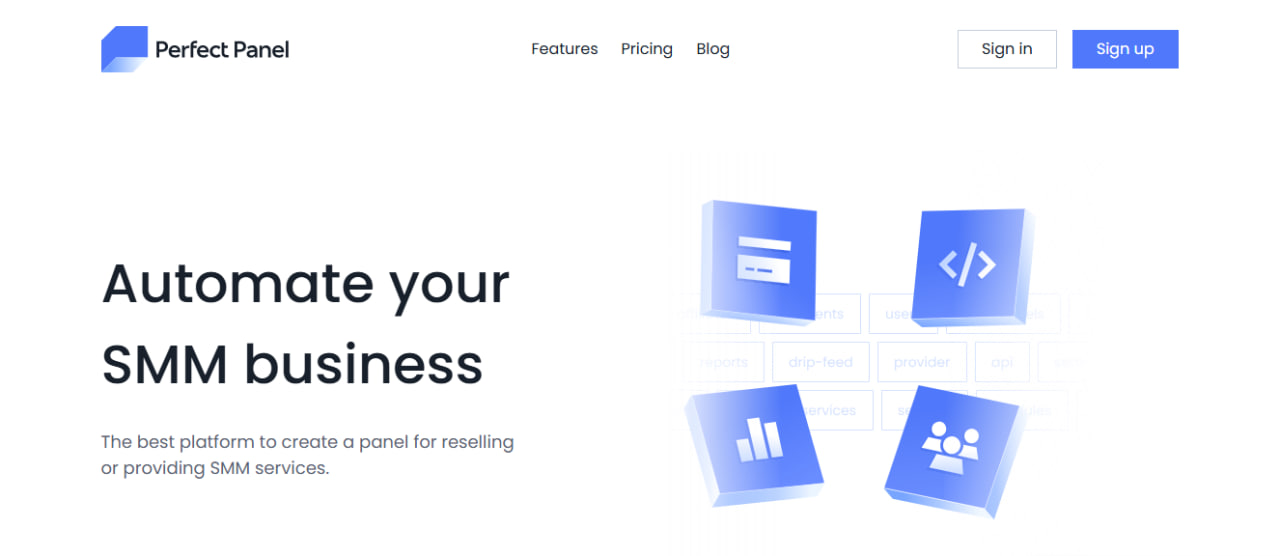
Step 1 – Getting the PerfectPanel SMM Panel Script
Before anything else, you need access to the PerfectPanel script. Make sure you obtain it from an official or trusted source. This is important for security, updates, and long-term stability.
When choosing a version, pay attention to:
- Update frequency
- Bug fixes and changelogs
- Documentation quality
A well-supported script saves you time and prevents technical issues later.
Step 2 – Domain Setup in PerfectPanel SMM Panel
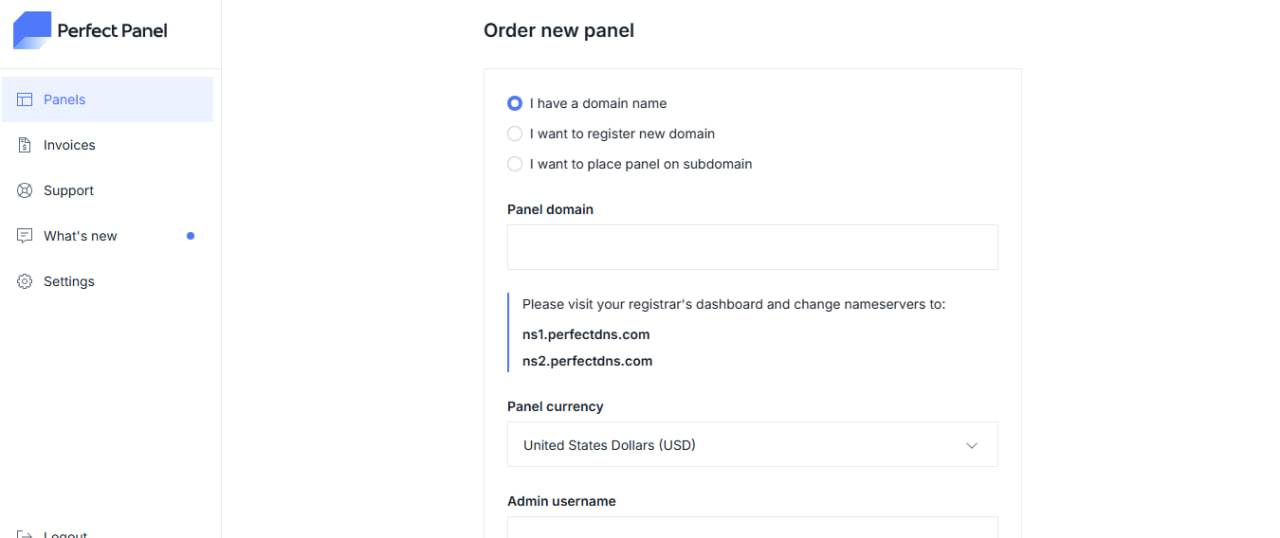
Before using your PerfectPanel SMM panel, you need to connect a domain. PerfectPanel handles hosting internally, so you don’t need to buy separate server hosting or upload files manually.
Inside the PerfectPanel dashboard, go to Panels → Order New Panel and choose one of the available options:
-
I have a domain name – use an existing domain
-
I want to register a new domain – buy a domain directly
-
I want to place panel on subdomain – use a subdomain for your panel
After entering your domain, PerfectPanel will provide custom nameservers.
You must log in to your domain registrar and update the nameservers to:
-
ns1.perfectdns.com -
ns2.perfectdns.com
Once the nameservers are updated, DNS propagation usually takes a few hours. After that, your PerfectPanel SMM panel domain will be fully connected and ready for activation.
At this stage, you can also select the default panel currency, such as USD, which will be used for user balances and payments.
Step 2.1 – Buying a Domain for Your PerfectPanel SMM Panel
If you don’t already have a domain, PerfectPanel allows you to connect a newly purchased one. You can register a domain with any registrar you trust. In this example, we’ll use Regery, but the process is similar with most domain providers.
First, choose a short and brandable domain name. Avoid using spammy keywords like “cheap”, “boost”, or “followers” directly in the domain. A clean brand-style domain works better for long-term SEO and user trust.
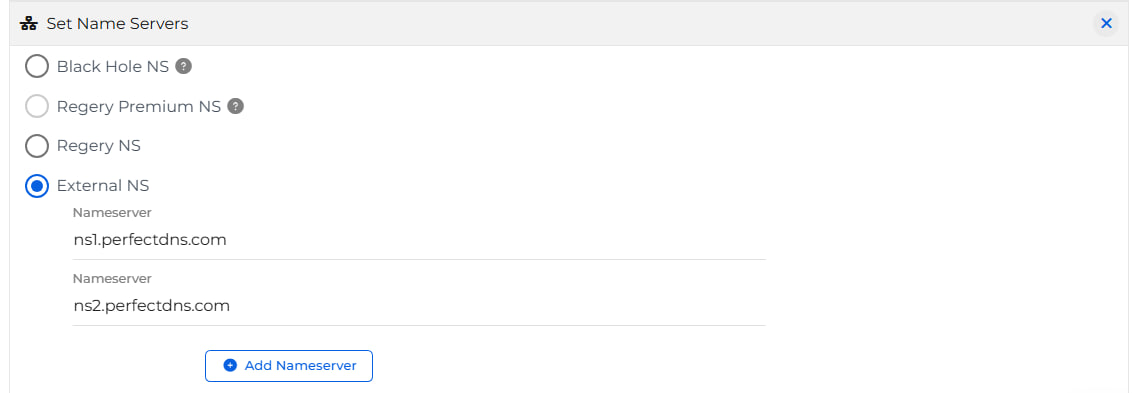
After purchasing the domain, log in to your registrar’s dashboard. In Regery, open the domain management section and go to Set Name Servers.
Select External NS and enter the following PerfectPanel nameservers:
-
ns1.perfectdns.com -
ns2.perfectdns.com
Make sure no additional nameservers are active. Save the changes once both nameservers are added.
Domain propagation usually takes from a few minutes up to several hours. During this time, PerfectPanel will automatically detect the domain connection.
Once the nameservers are updated successfully, return to your PerfectPanel dashboard and continue with the panel activation process.
Step 3 – Activating and Accessing Your PerfectPanel SMM Panel
Unlike self-hosted scripts, PerfectPanel does not require manual installation. As soon as your domain is connected and approved, the panel is automatically deployed.
After activation, you will receive access to the admin area where you can:
-
Log in using your admin username
-
Configure basic panel settings
-
Manage users and services
The first thing you should do after logging in is update your admin password and review security settings. Since your PerfectPanel SMM panel will process payments and orders, securing admin access is critical.
From this point, your panel is live and ready for further configuration, including API provider connections and service setup.
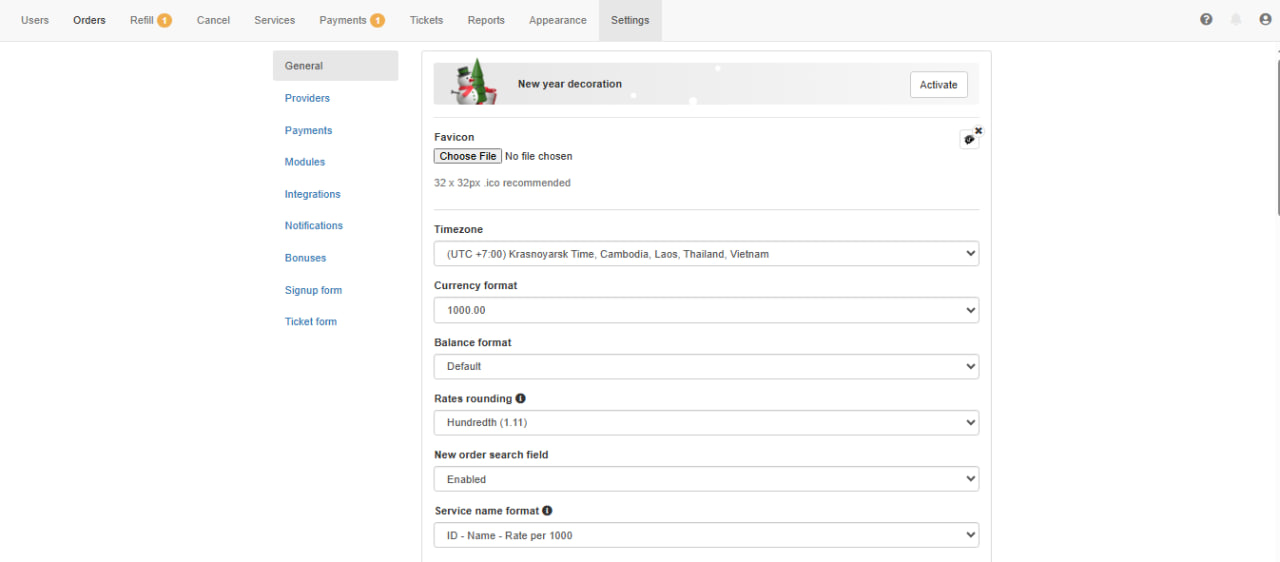
Step 4 – Basic Configuration of PerfectPanel SMM Panel
Before adding services, you should configure the basic panel settings.
This includes:
- Website name and logo
- Default currency
- User registration settings
- Order notifications
Keep the interface clean and simple. A confusing dashboard increases support requests and lowers conversion rates.
Step 5 – Adding an API Provider in PerfectPanel SMM Panel
API providers supply the services that your clients order on your PerfectPanel SMM panel. Without at least one connected provider, your panel cannot process orders.
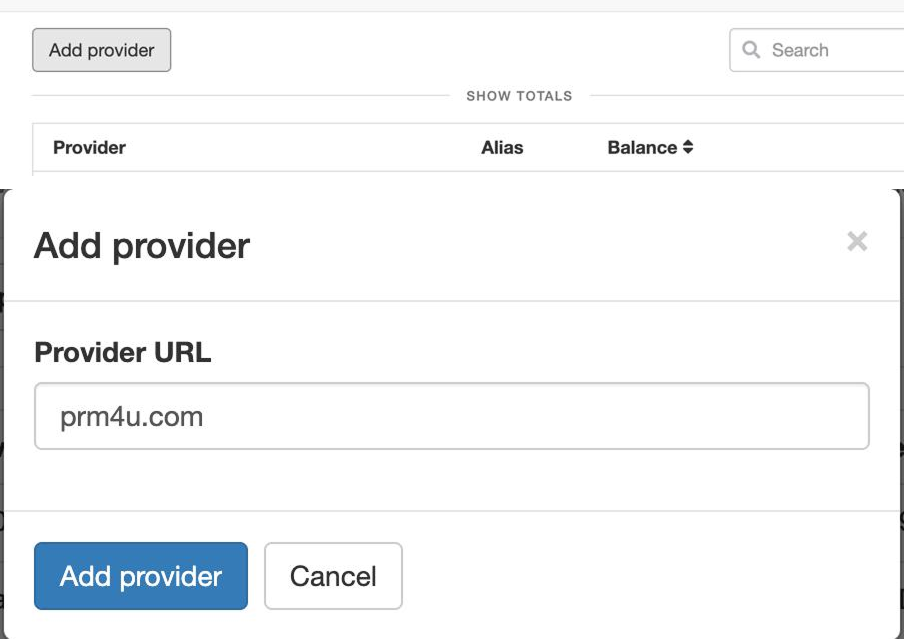
To add a provider, log in to the admin dashboard and go to Providers. On this page, you’ll see a list of connected providers and their balances.
Click Add provider. A popup window will appear where you need to enter the provider details.
In the Provider URL field, insert the main website URL of your provider. For example: PRM4U.
After confirming, the provider will be added to your list. At this stage, the provider is connected, but services will not work until you add a valid API key.
PerfectPanel allows you to connect multiple providers at the same time. This helps you diversify services, compare quality, and reduce dependency on a single source.
Step 5.1 – Getting an API Key from Your SMM Provider (PRM4U Example)
After adding the provider URL, you need an API key to authorize communication between your PerfectPanel SMM panel and the provider.
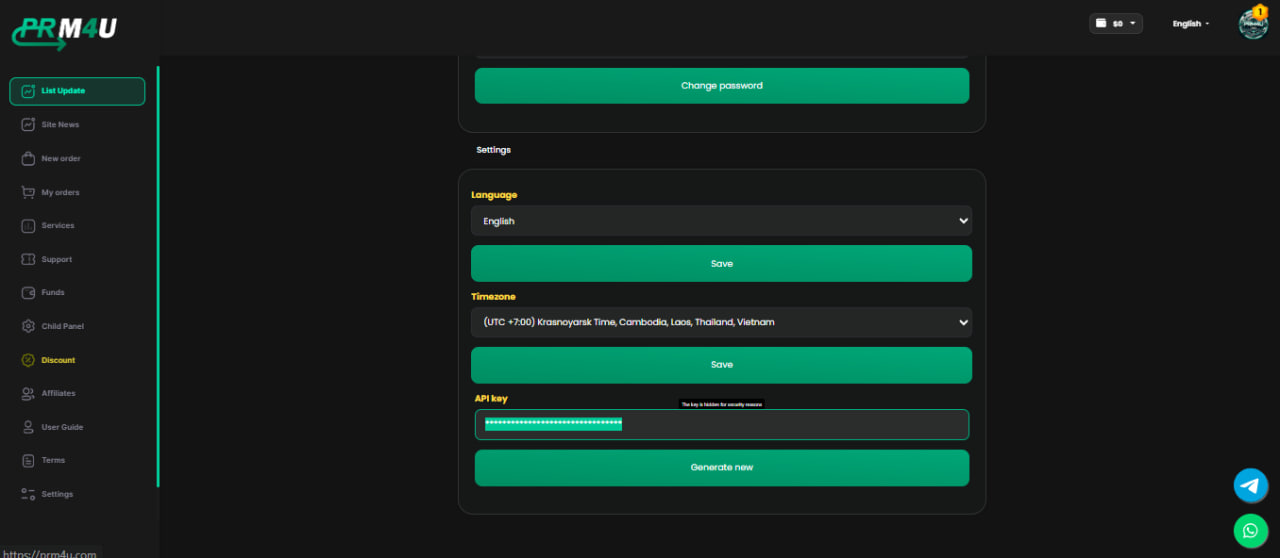
Go to your provider’s website. In this example, we’ll use PRM4U.
-
Log in to your PRM4U account
-
Open the Settings section
-
Scroll to the very bottom of the page
-
Locate the API Key field
-
Copy your API key
Return to your PerfectPanel admin panel, open the provider settings, and paste the API key into the corresponding field.
Once the API key is saved, your PerfectPanel SMM panel will be able to fetch services, check balances, and send orders automatically.
For security reasons, never share your API key publicly and regenerate it if you suspect unauthorized access.
Step 6 – Adding and Managing Services in PerfectPanel SMM Panel
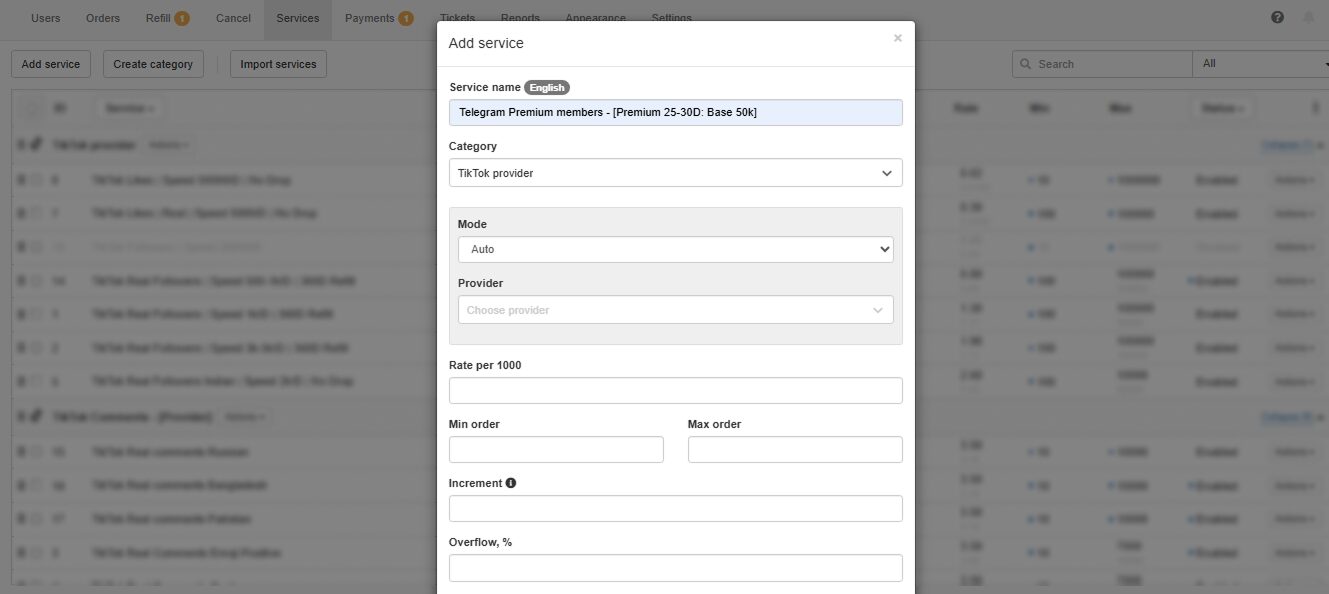
Once services are imported, you’ll need to customize them for your panel.
Key things to adjust:
- Service names (make them clear and simple)
- Minimum and maximum order limits
- Pricing and profit margins
- Descriptions and warnings
Avoid copying provider descriptions word-for-word. Rewrite them in simple English to reduce confusion and refund requests.
Step 7 – Pricing Strategy and Profit Margins in PerfectPanel SMM Panel
Pricing is where many new panel owners make mistakes. Too cheap, and you make no profit. Too expensive, and users leave.
A healthy starting margin is usually 5–15%, depending on your niche and traffic source.
Tips for pricing:
- Offer competitive prices on popular services
- Use higher margins on niche or premium services
- Test different price points over time
PerfectPanel makes it easy to adjust prices without affecting existing orders.
Step 8 – Payment Methods and Automation in PerfectPanel SMM Panel
To run a serious SMM panel, you need automated payments.
Common payment options include:
- Crypto payments
- Online payment gateways
- Manual balance top-ups
Make sure payment instructions are clear and visible. Confusing payment flows reduce conversion rates and increase support tickets.
Automation is where PerfectPanel really shines. When configured correctly, orders are processed automatically from payment to delivery.
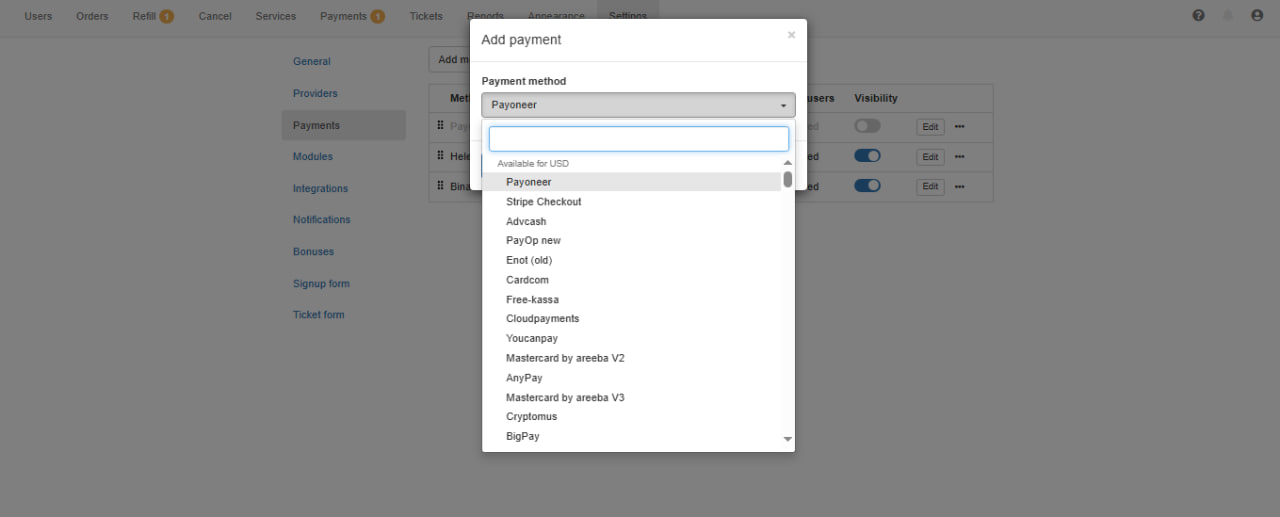
In this guide, we cover the basic steps required to connect a payment gateway to your PerfectPanel SMM panel. However, payment providers often have additional verification, compliance, and configuration requirements.
In a separate article, we will publish a full step-by-step guide on how to connect and configure payment gateways for PerfectPanel, including account verification, common approval issues, and best practices for stable payments.
This detailed payment setup guide will help you avoid common mistakes and ensure smooth payment processing for your SMM panel.
Step 9 – SEO and Traffic for PerfectPanel SMM Panel
Even the best SMM panel won’t make money without traffic.
Basic SEO steps:
- Create clear service pages
- Write helpful guides and FAQs
- Optimize meta titles and descriptions
- Focus on long-tail keywords like “cheap SMM panel for resellers”
Avoid spammy backlink tactics. Long-term SEO works better for SMM panels than short-term tricks.

Common Mistakes When Using PerfectPanel SMM Panel
Many beginners repeat the same errors:
- Adding too many low-quality services
- Ignoring user experience
- Copying content from other panels
- Competing only on price
Treat your panel as a real business, not a quick experiment.
FAQ About PerfectPanel SMM Panel
Is PerfectPanel good for beginners?
Yes. The interface is user-friendly, and most features are easy to understand with basic technical knowledge.
Can I use multiple API providers?
Yes, PerfectPanel supports multiple providers simultaneously.
How much can I earn with an SMM panel?
Earnings depend on traffic, pricing, and service quality. Many resellers start small and scale over time.
Final Thoughts on PerfectPanel SMM Panel
PerfectPanel is a powerful solution for anyone who wants to build a professional PerfectPanel SMM panel. With proper setup, smart pricing, and consistent traffic, it can become a reliable source of income.
Focus on quality, automation, and long-term growth. If you treat your panel seriously, PerfectPanel gives you all the tools you need to succeed.